Simply Draw: Learn to Draw
- 4.7
- Rating
- 10.00M
- Installs
- Free
- Price
 Analysis by App-foxy
I approached Simply Draw: Learn to Draw as a practical learning tool rather than a gallery of inspirational pictures. Its promise is straightforward: guide me through drawing lessons one step at a time. That focus makes it easier to judge than a broad creative app, because the important questions are whether the instructions feel manageable, whether practice fits into an ordinary day, and whether the app remains comfortable when I return to the same lesson repeatedly.
Developed by Simply Ltd, this free Education app is aimed at people who want a clear starting point for drawing on an iPhone or iPad. It is suitable for Everyone, and the current release is version 1.5.0. The app has built a strong audience, with an average rating of 4.8 from roughly 29,000 ratings, while its install count has passed 500,000. Those figures suggest that the simple lesson-based approach appeals to more than a small group of dedicated artists, although popularity alone does not decide whether it will suit your learning style.
How Simply Draw feels during real practice
I find the best way to judge Simply Draw is to notice what happens between the guided steps: whether I pause to study a shape, try it myself, and learn from the result rather than simply move on. That small habit can make a short practice session more useful, and it also sets up a closer look at how the app’s learning approach fits into everyday use.
You May Also Like

 Blood Strike: 2.5 Anniversary
Blood Strike’s Loadouts Turn Every Drop Into a Tactical Gamble
A close look at Blood Strike’s custom loadouts: how fast access to signature weapons reshapes its battle royale rhythm, rewards preparation, and narrows the gap between fights.

 Pandora - Music & Podcasts
Pandora’s Music Is Easy to Start, but Harder to Recover
Pandora’s strength is its low-effort path from a seed to a station. Its weak spot is how much confidence it asks you to place in connection, setup, and quiet recovery.

 8 Ball Pool
 Is Built on Rivalries, Rematches, and Routine
A close look at the rivalries, rematches, shared routines, and unanswered safety questions that turn a quick pool match into a persistent mobile community.

 Samsung Music
’s Quiet Strength Is Playing What You Already Own
Its reach comes less from spectacle than from dependable access to a personal library. That simplicity is both the app’s strongest retention engine and its ceiling.

 AccuWeather: Weather Radar
AccuWeather Review: A Quick, Clear Forecast for Everyday Decisions
For everyday plans, the best forecast is the one you can understand quickly. AccuWeather makes rain timing, radar, and local conditions easy to act on, with a few trade-offs.

 Hill Climb Racing
Why Hill Climb Racing Still Turns Crashes Into One More Run
A tiny car, a bumpy hill and one more upgrade: Hill Climb Racing keeps resurfacing because its simple chaos makes every near-miss feel personal.
More From Our News Desk



A gentle pace that works best in short sessions
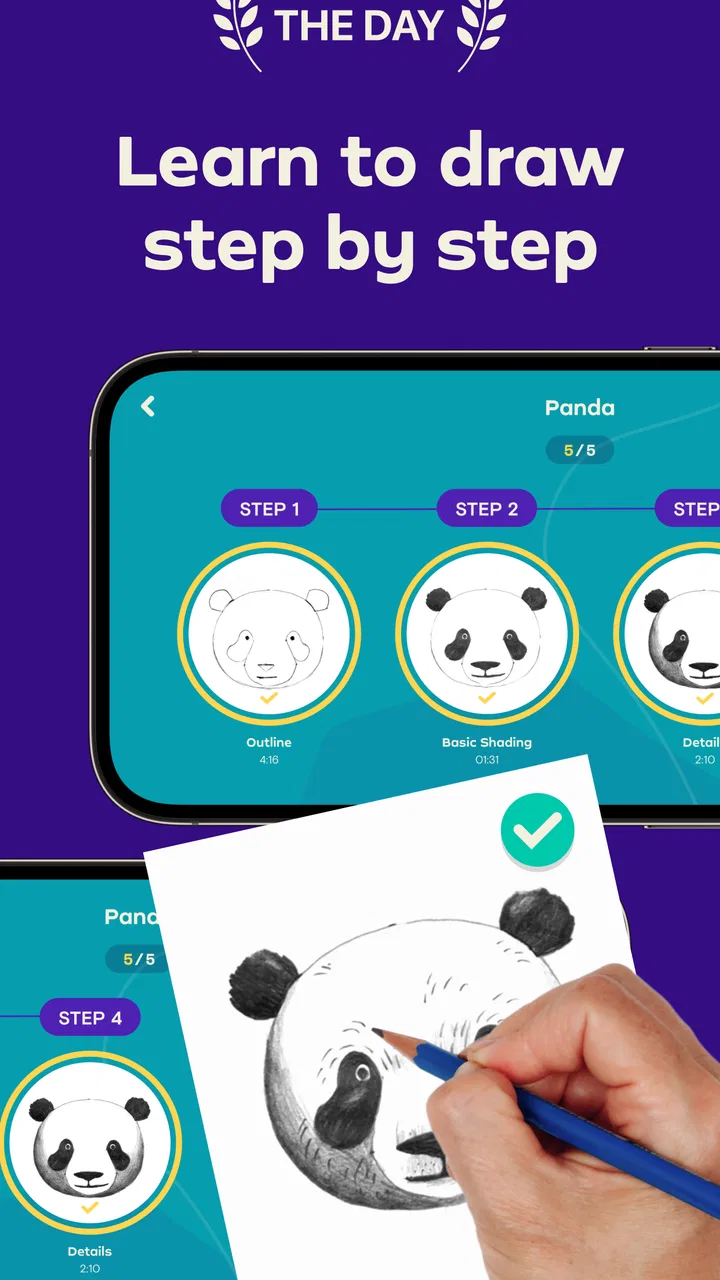
The main strength of the experience is its sense of progression. Instead of asking me to invent a subject, choose a brush, and work out a technique from scratch, it gives the learning process a defined direction. That matters when I am tired, short on time, or unsure what to draw. A step-by-step format reduces the mental effort before the pencil even touches the page.
I would use it in a ten-minute break, during a quiet evening, or as a small daily habit. The app is more useful when I treat each lesson as focused practice rather than a test of artistic ability. Trying to rush through instructions defeats the purpose: the value comes from observing each stage and comparing my result with the intended shape, proportion, or detail.
Its perceived speed is therefore less about fast navigation and more about how quickly I can begin drawing. A focused lesson gets me past the blank-page problem almost immediately. That is a meaningful advantage over opening a general sketching app, where the freedom can become another form of indecision.
What happens when I use it heavily
Repeated practice exposes a trade-off in guided learning. At first, the structure feels reassuring because every stage has a purpose. After several lessons, I may want to move faster, revisit a particular technique, or make a subject more personal. A lesson system can feel restrictive at that point, especially if I already understand the basics and want a freeform canvas instead of another sequence.
For that reason, I would not judge a long session by how many lessons I complete. A better workflow is to pause after a useful step and repeat the idea in my own sketchbook or drawing app. For example, I might study how a lesson builds a simple form, then draw three variations without following the guide. This turns the app from a passive copying exercise into a bridge toward independent practice.
That approach also helps with one subtle limitation: a finished guided drawing can look better than work produced without assistance, which may give a beginner an inflated sense of progress. Repeating the underlying construction away from the lesson shows whether I actually understood it. Simply Draw is strongest as a coach for fundamentals, not as a replacement for personal experimentation.
Stability and the value of recovering your routine
For a learning app, reliability is closely tied to continuity. If I use it sporadically, I need to be able to return without feeling lost. The step-by-step concept naturally supports that kind of recovery because I can resume practice through a defined lesson rather than reconstructing a plan from memory.
I would still keep expectations realistic. A guided drawing app cannot remove the normal frustration of learning to observe shapes and proportions. If a result looks wrong, the problem may be my rushed stroke or misunderstanding of the stage rather than an app failure. Taking a screenshot of a completed attempt, or keeping a small dated folder of drawings, gives me a more honest way to see improvement than relying on how confident I feel on a single day.
One useful recovery habit is to repeat an earlier lesson after a gap instead of always pushing forward. Familiar material makes it easier to notice whether my hand control has improved. It also prevents the common mistake of treating an interrupted routine as a reason to start over completely. The app’s guided format is particularly helpful here because it gives me a concrete place to restart.
Device requirements and everyday practicality
The minimum operating system is iOS 11, so the compatibility requirement is relatively modest for Apple devices that can still run that software. Even so, compatibility is not the only practical concern. Drawing lessons demand attention, and a small screen can make visual details less comfortable than a larger tablet display. If I am choosing between devices, I would prioritize a screen that lets me see the lesson clearly and draw without constantly repositioning my hand.
Resource demands are best considered in terms of session comfort rather than raw specifications. A short lesson should fit naturally into ordinary mobile use, while extended practice can make any screen-based activity feel tiring. I would avoid judging the app solely by whether it opens quickly; the more important question is whether the interface stays readable and responsive while I follow several stages in succession.
People who draw primarily with a physical pencil may also need to decide whether the app complements or replaces paper. I see it as more useful alongside a notebook than as an absolute substitute. The screen provides guidance and sequence, while paper offers a different tactile response and makes it easier to repeat a shape without worrying about interface controls. That two-part workflow is especially sensible for beginners who want instruction but do not want all practice confined to a device.
Free access, paid expansion, and who should think twice
The app is free to download, but in-app purchases range from $14.99 to $89.99 per item. That makes it important to approach the free entry point as a chance to assess the teaching style, not as a guarantee that every part of the experience will remain free. Before paying, I would spend enough time with the available material to decide whether the lesson pacing, visual guidance, and subject choices match my goals.
The pricing also changes who should use it. Someone who wants occasional drawing prompts may find a paid expansion difficult to justify, particularly if a library book, a free tutorial, or a general sketching app already meets that need. On the other hand, a beginner who values a guided curriculum and is likely to practice consistently may see more value in a structured purchase than in collecting disconnected tutorials.
I would be cautious if I dislike subscription-style learning decisions, although the listed purchase range alone does not tell me how every purchase is presented inside the app. The practical advice is simple: inspect what is available before committing, consider how often you will actually practice, and compare the cost with your willingness to follow lessons rather than merely save them for later.
How it compares with ordinary alternatives
Compared with a blank-canvas drawing app, Simply Draw is less intimidating and less flexible. A freeform tool gives me complete control over brushes, layers, composition, and subject matter, but it also expects me to know what to do next. This app reverses that balance: it reduces choice so I can concentrate on following a visual process.
Compared with video tutorials, the guided lesson approach may feel easier to manage because I am not trying to pause a moving demonstration at exactly the right moment. A video can show natural hand movement and personality, but it can also encourage passive watching. Here, the useful test is whether I am actively drawing at each stage. If I find myself tapping through instructions without practicing, the format is no longer serving its purpose.
Compared with a live teacher, the app cannot observe my hand position, correct a mistaken proportion, or adapt its explanation to the exact reason I am struggling. That is the clearest boundary. It offers structure and repetition, not personal critique. I would choose a class, mentor, or community when feedback is the main thing I need.
Three ways to get more from the lessons
Use a two-pass method. On the first pass, follow the lesson carefully without worrying about making a beautiful final image. On the second, repeat the same subject while trying to remember the sequence before checking the next stage. This reveals whether I learned the construction or simply copied the screen.
Keep a “mistake page” beside the finished drawings. Rather than throwing away awkward attempts, I would record the shapes that repeatedly go wrong, such as uneven curves or misplaced details, and practice those elements separately. This turns frustration into a targeted exercise.
Change the scale after completing a lesson. A drawing that works at the app’s suggested size may feel different when made smaller or larger. Repeating it at another scale tests control and makes the lesson more transferable to notebooks, cards, or personal sketches.
These habits address a weakness shared by many guided art tools: they can make following directions feel like progress even when the learner has not yet gained independence. Simply Draw becomes more valuable when I deliberately move between imitation, memory, and variation.
Who will enjoy it, and who should skip it
I would recommend it to a complete beginner who wants a clear first step, a casual learner who needs prompts to practice regularly, or a parent looking for an approachable creative activity suitable for an Everyone-rated audience. It can also help an experienced person who wants a low-pressure warm-up, although advanced artists may outgrow the guided format quickly.
I would skip it if my priority is professional illustration, advanced digital painting, detailed brush customization, or direct feedback from an instructor. I would also hesitate if I know I rarely follow structured courses. In that case, a simple sketchbook or freeform drawing app may be more honest and more useful, because it will not ask me to pay for a learning library I am unlikely to open.
The app is not a shortcut to artistic confidence. It cannot make every drawing look polished, and it cannot decide what kind of artist I want to become. What it can do is make the first few decisions easier: choose a lesson, follow a sequence, notice where the drawing changes, and try again. That is a modest goal, but it is exactly why the experience feels approachable.
My performance verdict
After considering speed, heavier use, device comfort, stability, and the cost of expanding the experience, I see Simply Draw as a focused beginner tool rather than a complete art studio. Its best performance is perceptual: it gets me practicing faster by removing the blank-page hesitation. Its biggest limitation is the same structure that makes it welcoming, because learners seeking freedom or advanced control may eventually feel boxed in.
The free starting point makes it reasonable to test personally, while the paid items mean I would make a deliberate decision before expanding access. I would begin with short sessions, repeat lessons instead of racing through them, and transfer each new idea to paper or a separate canvas. That workflow gives the app a job it can perform well without expecting it to provide critique, professional tools, or unlimited creative flexibility.
My final view is positive, with a clear condition: Simply Draw is worth trying when you need guidance more than freedom. It is a friendly entry into drawing practice, especially for someone who feels stuck before beginning. If your goal is to build a steady habit and learn through manageable stages, I can recommend it. If you already know the fundamentals or want a fully open-ended workspace, another kind of drawing app will probably serve you better.
For me, the deciding factor is not the number of lessons I can finish. It is whether I return to draw again the next day, remember something from the previous exercise, and feel ready to make a variation without being told every move. When the app encourages that transition, it earns its place as a useful learning companion rather than just another collection of prompts.
FAQs for Simply Draw: Learn to Draw
01What is Simply Draw: Learn to Draw?
Simply Draw: Learn to Draw is an educational app designed to help users of all ages improve their drawing skills. It offers a variety of tutorials and interactive lessons that guide users through the basics to more advanced techniques. Whether you're a beginner or looking to refine your artistry, this app provides the tools to enhance your creativity.
02What features does Simply Draw offer to beginners?
Simply Draw provides a user-friendly interface for beginners, featuring step-by-step tutorials on basic drawing techniques such as shading, perspective, and anatomy. The app includes practice exercises, a variety of drawing tools, and interactive feedback to ensure users can learn at their own pace and track their progress effectively.
03Are there any in-app purchases in Simply Draw: Learn to Draw?
Yes, Simply Draw: Learn to Draw offers in-app purchases. While the app provides a range of free content, additional lessons, advanced tools, and premium features require a purchase. These options are designed to enhance the learning experience, but the core functionality remains accessible without spending money.
04Does Simply Draw support offline use?
Simply Draw supports offline use, allowing users to access downloaded lessons and practice without an internet connection. However, initial downloads of new content and updates require connectivity. This feature ensures that users can continue honing their skills anytime, anywhere, even without Wi-Fi or data access.
05Is Simply Draw suitable for professional artists?
Simply Draw caters primarily to beginners and intermediate learners, but it also offers value to professional artists seeking to refine specific techniques. The app includes advanced tutorials and customizable tools that professionals might find useful for practice or inspiration, although it may not replace more comprehensive professional software.
Pros
- User-friendly interface for beginners.
- Wide range of drawing tools available.
- Step-by-step tutorials enhance learning.
- Offline mode for uninterrupted practice.
- Regular updates with new features.
Cons
- Lacks advanced features for professionals.
- Ads can be intrusive during sessions.
- Limited color palette in free version.
- Requires in-app purchases for full access.
- No support for pressure-sensitive styluses.

Simply Draw: Learn to Draw
Gallery